
Copying files to a VMWare Server

I am using VMWare a lot for my Oracle activites. To be specific I use the VMWare Server. Now one of the missing features of the VMWare Server is that the drag and drop of files does not work.
Typically with a Linux I use WinSCP from my Windows Vista host. With a Windows guest I often use the feature of the Remote Desktop to connect my local drive.
Another possibility exists, although it is a little awkward and almost cumbersome if you need to transport a lot of files.
In the VMWare Server a utility exists which will copy a file into the guest OS. This utility is called vmrun and it works as follows.
Go to the directory where the file that you want to copy is located. Then execute the vmrun command with the following switches:
-T server
-h https://yourVMWareServerName:port/sdk (typically the port is 8333)
-u username_of_the_vmware_server
-p password_of_the_vmware_server
-gu username_of_the_vmware_guest
-gp password_of_the_vmware_guest
copyFileFromHostToGuest
“VMWare Configuration File”
source_file_name target_file_name
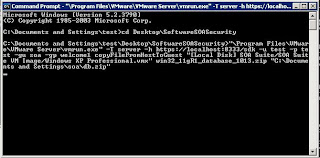
In the following screenshot you can see this command in action.


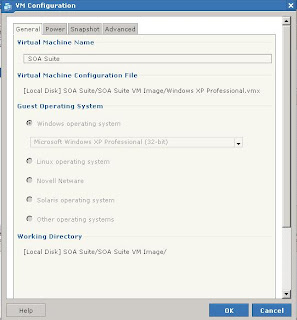
If you don’t know the VMWare configuration file location go to the summary page of the VMWare image and click on the “Configure VM”. This will bring up the following dialog box. The VMWare configuration file location is in the second part of the dialog box.

Comments

eMarcelCom said…
Well, It's good to know about that possibility which is vmrun. Thanks for info Andreas! However I haven't found it more handy than WinScp or Remote desktop - so many arguments must be provided, command line and so on. WinSCP can be also used from command line in similar way as ftp client, but here we have connection secured with all common commands available.

Cheers!!
Admin said…
Hi, my name is Christ Kowandi, I'm from Indonesia, honestly i am not very familiar with this VM Server thing, but i really admire the way you make and master fully this simple blog. It's description and originality is very good. Nice to know you. I also own a blog, sports blog, if you have time, please pay me a visit. Bye and thanks.
divorced said…
Good tip. I always RDP'ed to the server (quicker interface than the console) and just shared my local resources on the RDP settings. Copy to and from that way. It's a bit slow but it works. However, that will only work for Windows...

Popular posts from this blog

Oracle Fusion Middleware Forum in Valencia

Last week the 22nd Fusion Middleware and PaaS Partner Community Forum took place in Valencia, Spain. For me this was a very valuable experience - again as I have visited a number of #ofmForum before. Let me recap here the highlights of this meeting. After a great Welcome-Reception the evening before, where everybody had the chance to catch up with a large number of old (and soon-to-be new) friends, the conference started with a kind of the state of the union by Jürgen Kress. The community already has more than 8000 people. This - in a fact - is a tremendous achievement. Everybody agrees that this is only possible by the relentless work of Jürgen who puts a big effort into this. It shows that other areas inside the Oracle technology stack do not benefit by equivalent communities. Even other communities, when they exist at all, do not compete in the same league. So a VERY BIG THANK YOU for Jürgen is at its place here. After the opening a keynote from Alistair Hopkins showed ver...

Oracle Streams Explorer

At the recent Oracle SOA Suite community forum in Budapest I had a hands-on experience with the Oracle Streams Explorer. Having worked with the Oracle Complex Event Processing and also some hands-on exercises with the new Oracle Event Processing, the Oracle Streams Explorer is a very easy to handle and useful addition to the area of near-real-time data insight and analysis. The user interface comes along in the new Oracle look-and-feel. You can select a number of areas like IOT, Risk and Fraud Management, Transportation and Logistics, Customer Experience and Analysis and Telecommunications. Within that you get a number of predefined patterns and resources. Defining your own solution can therefore be based on an existing solution in your catalog or simply by combining input streams and defining filters on them. Now plenty of examples can (and will) be named. The essence for me - and this is a message that I will convey to customers - is the fact that by using Oracle Streams Expl...

Paas Summercamp 2017 in Lisbon

So – another summer camp is over. What was the outcome of this? Was there more to it than meeting some old friends, dive into some slides, get your hands dirty on new versions and finally talk about it over a glass of Portuguese wine or beer? So let’s start at the beginning – where are we right now? In the Process Cloud Service track the global PM Nathan Angstadt kicked of the session by asking how many projects we are on that use PCS and how we get along selling the product. The outcome was somewhat predictable: about one or two participants were on PCS projects, and selling is still a big issue. We discussed the various reasons for that. The main essence was that the PCS is often positioned at previous BPM customers who still have to deal with large BPM implementations and are somewhat afraid of the new PCS-style. BPM and PCS are two different things. They target different customer issues. BPM is still useful when it comes to large scale implementation...